
VPN impact on internet speed explained 💨
Discover how VPNs work and why they won't significantly affect your internet speed. Learn the benefits of using a VPN without compromising your online performance.
11/2/20253 min read


If you’re thinking about getting a VPN, one of the first questions that comes to mind is:
“Will a VPN slow down my internet?”
The short answer? A little — but not as much as you think.
Modern VPNs like NordVPN, Surfshark, and PureVPN are engineered to deliver fast, stable connections while keeping your data safe and private. In most cases, the difference in speed is minimal and often unnoticeable.
Let’s break down why VPNs can affect speed, what you can do to minimize it, and how to choose a provider that keeps your internet blazing fast.
Why VPNs might slow down your connection?
When you use a VPN, your traffic is encrypted and routed through a secure server before reaching the website or app you’re accessing.
This extra step can sometimes cause a slight drop in speed, depending on:
Server distance – The farther the server, the longer your data travels.
Encryption strength – Strong encryption (like AES-256) adds a small processing delay.
Server load – Overcrowded servers can temporarily slow down your connection.
Your base internet speed – The slower your original connection, the more noticeable any loss may be.
However, with the right VPN, these effects are barely perceptible. Especially when using modern VPN protocols optimized for speed.
Top-tier VPNs use next-generation technologies that balance speed and security beautifully.
Here’s what makes a difference:
WireGuard Protocol: A lightweight, ultra-efficient protocol that provides near-native internet speeds.
NordLynx (by NordVPN): A custom version of WireGuard with added privacy protection and even faster performance.
Smart Routing: Automatically connects you to the least crowded, fastest server available.
Optimized Network: Providers like Surfshark and PureVPN maintain thousands of high-speed servers worldwide to reduce latency.
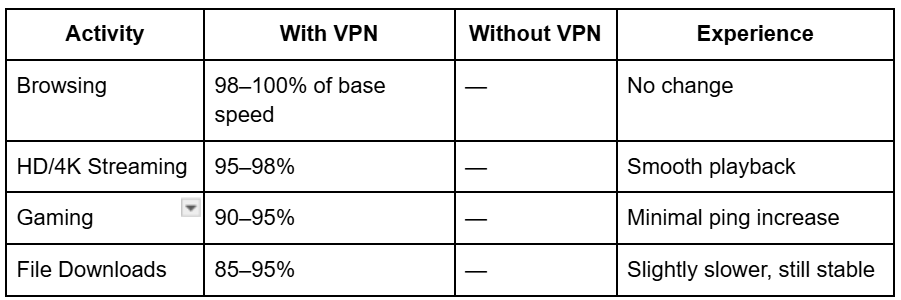
In real-world testing, users often experience less than 5–10% speed difference when connected to nearby VPN servers — virtually unnoticeable for streaming, gaming, or video calls.
Real performance: What to expect?
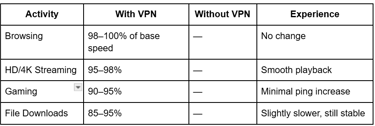
Here’s what you can typically expect from the best VPNs in 2025:
When a VPN can actually improve your speed?
Yes! And surprisingly, in some cases, a VPN can even make your connection faster!
Here’s how:
Some ISPs (Internet Service Provders) throttle your bandwidth during streaming or gaming. A VPN hides your activity, preventing throttling.
Certain VPN servers optimize routing, reducing congestion and improving stability.
You can access faster international routes for specific platforms or regions.
So, while a VPN technically adds one extra “hop,” it can still deliver smoother, faster performance overall.
How to maximize VPN speed?
To get the best performance out of your VPN:
Use WireGuard or NordLynx protocol for high-speed connections.
Connect to a nearby server for lower latency.
Close background apps consuming bandwidth.
Switch servers if one seems slow.
🚫 Avoid free VPNs — they often cap speeds and overload servers.
👉 Learn here which FREE VPNs are best and their limitations (only safe ones)
Best VPNs for speed and performance
A good VPN might slightly reduce your speed, but the trade-off is worth it.
With the right provider and settings, the speed loss is minimal, while the benefits to privacy, security, and freedom are massive.
If you’re streaming, gaming, or just browsing safely, you’ll barely notice the difference.
👉 VPNs like NordVPN, Surfshark, and PureVPN deliver speed, security, and stability — all in one.
Start protecting your connection today without slowing down your life.
Related guides
How modern VPNs keep your internet fast?
If speed is your top priority, these VPNs consistently rank highest in global tests:
🥇 NordVPN – Fastest VPN overall with NordLynx and 5,500+ servers.
🥈 Surfshark – WireGuard-powered, unlimited devices, and excellent consistency.
🥉 PureVPN – Great for streaming and global access, optimized for low latency.
All three offer top-tier encryption, verified no-logs policies, and 30-day money-back guarantees — so you can test their speed risk-free.
Tip: Always connect to the nearest server for the best speed, and use WireGuard/NordLynx instead of older protocols like OpenVPN when possible.