
How Many Devices Can I Use with One VPN Account?
Discover how many devices you can use with a single VPN account. Learn about VPN devices limits and find the best VPN for multiple devices to enhance your online security.
11/2/20252 min read


Most of us use multiple devices daily: phones, laptops, tablets, smart TVs, and even gaming consoles. But when it comes to protecting them all, one common question arises:
“How many devices can I use with one VPN account?”
The answer depends on your VPN provider, and choosing the right one can save you money and keep your entire digital life secure.
Let’s break down how device limits work, which VPNs offer the most connections, and how you can protect every device under one plan.
What “Simultaneous Connections” mean?
When VPN providers talk about simultaneous connections, they’re referring to the number of devices you can connect to their service at the same time using a single account.
For example, if a VPN allows 10 simultaneous connections, you can protect:
Your phone
Your laptop
Your tablet
Your smart TV
A family member’s devices, all at once!
Each connection uses the same VPN subscription, so you don’t need multiple accounts
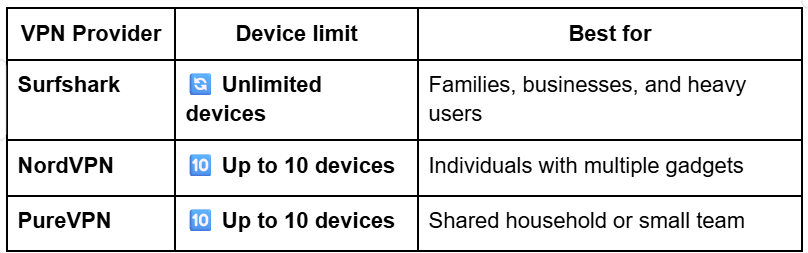
Different VPNs have different connection policies. Here’s a quick breakdown of the leading services in 2025:
Why Multi-Device VPN support matters?
Today, security threats don’t just target your computer. They target your entire digital ecosystem.
A VPN with multiple device support ensures you’re protected across all touchpoints.
Benefits include:
Always-on protection: Whether you’re on mobile data, Wi-Fi, or home broadband.
Family-wide security: Share your account safely with household members.
Work-from-anywhere coverage Secure laptops, phones, and tablets simultaneously.
Device versatility: Use VPNs on consoles, TVs, and IoT devices with ease.
Having generous or unlimited connections means you don’t have to pick which devices stay safe, you can protect them all!
Best VPNs for multiple devices
Here are our expert recommendations for VPNs that excel in multi-device support:
Surfshark: Offers unlimited connections, ideal for families or power users.
NordVPN: Allows 10 simultaneous connections, with industry-leading speed and privacy.
PureVPN: Supports 10 devices and includes dedicated IP options for added control.
All three offer cross-platform apps (Windows, macOS, Android, iOS, Linux, routers, smart TVs). So you can stay secure on everything from your phone to your PlayStation.
How to maximize Multi-Device protection?
The number of devices you can use with a VPN depends on the provider, but the best services are generous and flexible.
Surfshark gives you unlimited connections, protect everything with no limits.
NordVPN and PureVPN allow up to 10 simultaneous devices, perfect for most users.
Whether you’re securing your home, family, or business, a VPN with multi-device support means complete protection under one account: simple, affordable, and secure.
Related guides
Typical device limits by provider
Install VPN apps on your main devices first (phone, laptop, TV).
Set up the VPN on your home router to automatically protect every device on your Wi-Fi network.
Use browser extensions for lightweight protection on Chrome, Firefox, or Edge.
Share your VPN account with trusted family members, many plans allow it (Surfshark).
With these steps, you can extend one VPN subscription to cover your entire digital ecosystem efficiently.
Tip: Even if your provider limits connections, you can install the VPN on your router to protect every device on your network without using multiple slots.